
Once the survey's implementation period has begun, suppliers will be able to submit their responses to the survey. Additionally, the system will automatically send an email to suppliers to notify them of the survey's commencement.
Supplier Response Process
For details on how suppliers submit their responses, please refer to the help page designated for respondents.
Monitoring Supplier Response Status
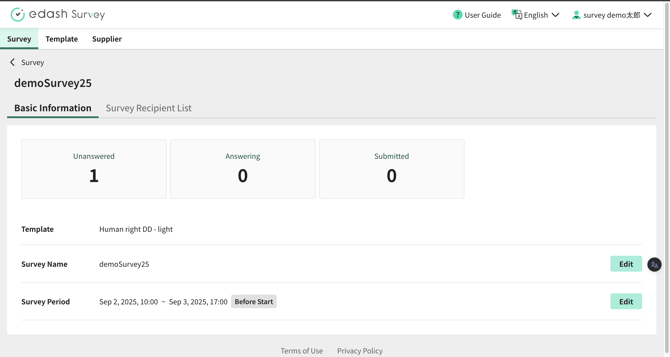
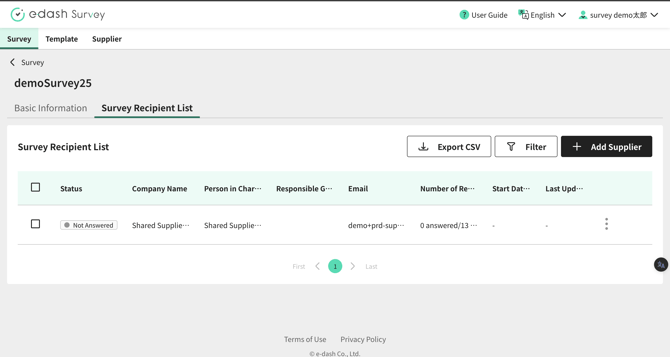
The Survey Details screen allows you to view a summary of response statuses and the status for each individual supplier.
- You can check the response status summary from the "Basic Information" tab on the Survey Details screen.
- You can review the response status for each supplier from the "Recipient List" tab on the Survey Details screen.
Sending Emails to Suppliers
You can send reminder emails from the Survey Details screen. These reminder emails can include "Company Name" and "User Name" as variables in both the email subject and body.
- If you are sending an email to a single supplier, click "Send Email" within the three-dot menu in their row in the table.
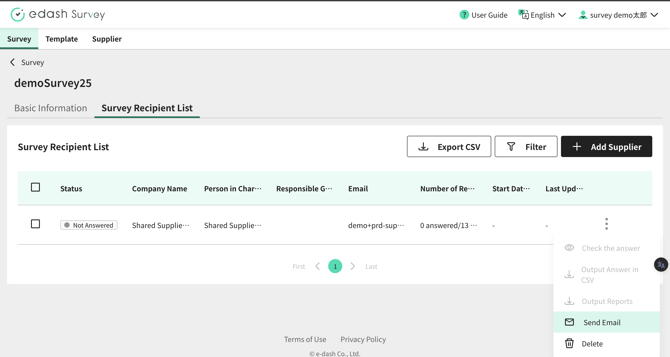
- If you are sending emails to multiple suppliers, select the target suppliers using the checkboxes in the table and then click "Send Email" which appears at the top of the table.
- Please compose the email content.
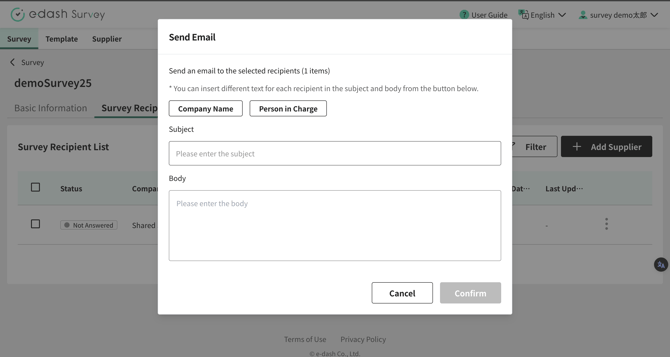
- Review the email content. If it is satisfactory, click "Send".