
You can register users and assign permissions for your company via the Account Management screen.
Accessing the Account Management Screen
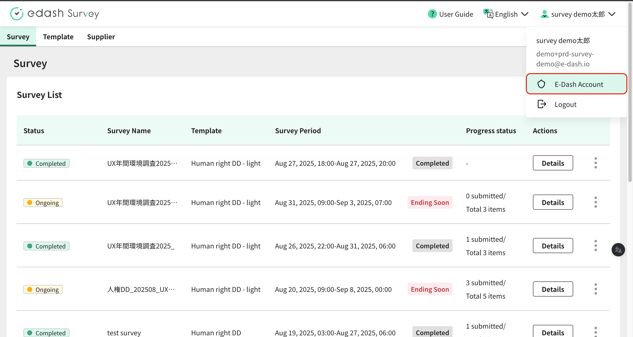
To access the Account Management screen, click your account name in the header, then select it from the displayed menu.
Group Settings
To configure groups for your e-dash Co., Ltd. environment, please provide e-dash Co., Ltd. with a list of your desired groups, and we will set them up for you. For more details, kindly contact your e-dash Co., Ltd. representative.
Registering New Accounts
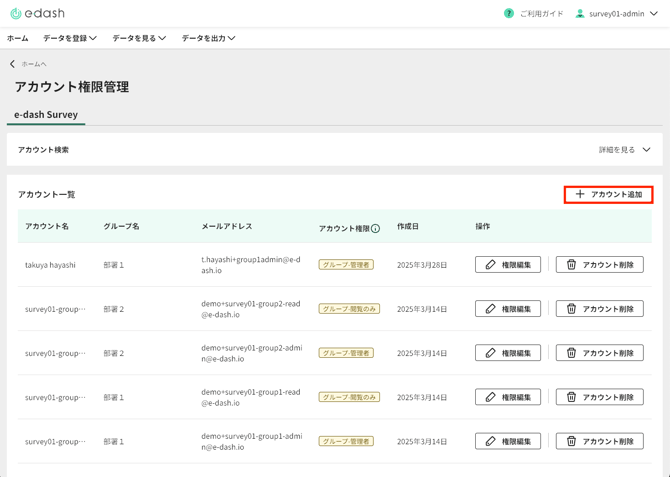
You can add new accounts by clicking "Add Account" located at the top right of the account list.
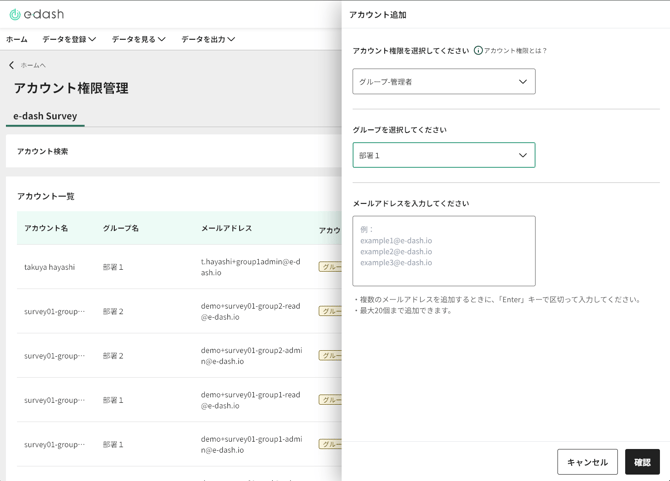
When adding an account, please select the account's permission level and group, enter the email address(es) of the intended recipient(s), and then click the "Confirm" button. If you are assigning permissions to multiple recipients simultaneously, enter their email addresses separated by line breaks. For information on the operational differences between various permission levels, please refer to the permission table below.
Modifying Permissions
You can change a specific user's permissions by clicking "Edit Permissions" in the account list.